


Welcome to Titan 7.3
Website Content Management at its Best!
Resources
- Review the information on this overview page
- Watch the overview video
- Check out the TITAN 7 Overview guide
What's New Overview
The Titan CMS Workstation has been streamlined to improve productivity. The new system brings a bright, appealing, refreshed style while maintaining a clean, professional look to enhance the workstation’s usability and your content management experience.


The new App Ribbon combines most of the page-level buttons and menus that the previous version displayed on the Page Action and Edit Tab toolbars.
Once you select one or more pages, head up top to the new App Ribbon to Create a new page, Edit your Content, Publish or Save pages, Access page Properties, Refresh Site Navigation
The Publish Menu contains the buttons that determine the status of your pages.
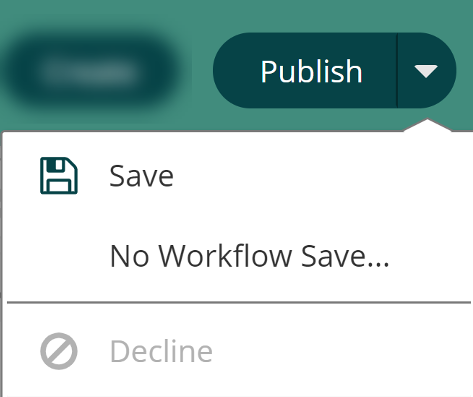
Save

Saves your changes to the page, file, folder, or event currently being edited but does not publish it. You will be prompted if you forget to perform a Save.
Publish

Publishes a page to the web.
No Workflow Save
Available exclusively for Webmasters. It allows an override of workflow to save and publish.
Decline

City departments do not currently use this workflow function.
The Action Menu is the new one-stop spot for Workstation basic tasks.
It combines the previous version's remaining Page Action and Edit Tab functions, providing quick access to edit, copy, delete a page, and more.

Edit

Opens the page or file so you can make changes.
Jump in Tree

Takes you to the item’s location in the Navigation Tree.
Open Live Version

Opens the item on your live site.
Copy

Used to copy a page or file to a different location.
Move

Used to move a page or file to a different location.
Delete

Allows you to delete the page, event, file, etc. that has been highlighted in the Workstation Tree. Deleted items go into the Recycle Bin where they can be restored. Items deleted from the Recycle Bin are permanently deleted.